
The email usually arrives without much warning. Your lease is ending, leadership wants a better location, or two offices are consolidating into one. You search office relocation services near me and quickly realize most providers talk about boxes, furniture, and moving trucks, while the riskiest part of the move sits in your server room, network closet, and old workstation inventory.
That’s where office moves go sideways. Desks can be replaced. Lost productivity, failed cutovers, and unmanaged drives full of company data are harder to clean up. A modern move is an operations project, a facilities project, and an information security project at the same time.
Embarking on Your Corporate Move
Office relocation looks simple from a distance. In practice, it’s one of the few projects that forces facilities, IT, HR, finance, legal, and vendors to work on one deadline. According to Camoin Associates’ summary of CBRE relocation data, over 30% of Fortune 500 companies executed major relocations or physical moves in the past six years. That tells you this isn’t unusual. It also tells you experienced coordination matters.

A lot of teams make the same first mistake. They treat the move as a transportation problem. It isn’t. It’s a continuity problem. If your internet circuit isn’t active, your badge access fails, or your decommissioned PCs leave the building without a documented chain of custody, the move was not successful.
What usually gets underestimated
The furniture move is visible, so it gets attention. The technology move is less visible, so it gets compressed into the last week. That’s exactly backwards.
Look at the support work around any serious move and the pattern is clear:
- Facilities coordination: loading dock rules, elevator reservations, floor protection, signage, and access windows
- IT readiness: cabling, circuits, rack planning, endpoint packing, printer strategy, Wi-Fi validation
- Security handling: device collection, media destruction decisions, and transfer records
- Closeout work: surplus removal, recycling, and final sweep of the old site
If you’re moving out of a space with old cubicles, obsolete monitors, and retired endpoints, an office cleanout service often needs to run in parallel with the move itself, not after it.
Practical rule: The move starts when you freeze the asset list, not when the first cart rolls onto the floor.
It also helps to look outside traditional moving content. The best transition advice often comes from teams that handle operational change more broadly, including security and site control. A useful example is GM GROUP Services expertise, which highlights how businesses in transition need tighter coordination than routine day-to-day operations.
The Relocation Blueprint A Master Timeline and Checklist
Most failed moves don’t fail on move day. They fail weeks earlier when nobody locked owners, dates, and dependencies. Office relocations work better when they follow a gated plan instead of a generic checklist. That matters because Move Solutions notes that corporate office relocations require synchronized execution across 8-12 distinct stakeholder groups, and 35-45% of relocations experience unplanned downtime, often tied to IT transition failures.
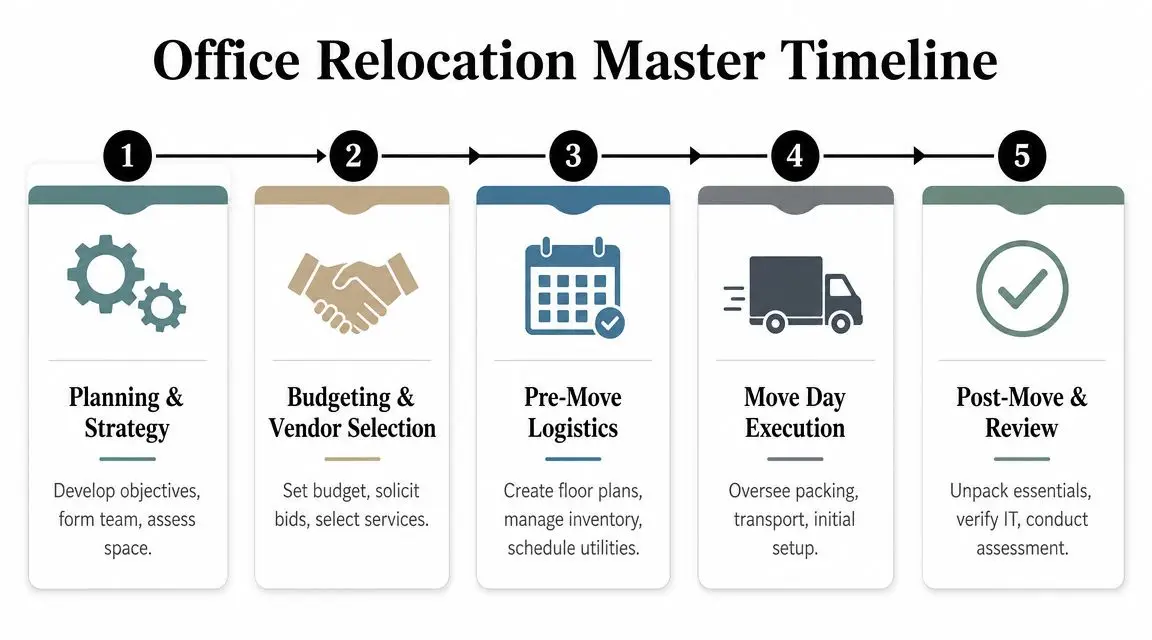
Six to twelve months out
Start with decisions, not packing.
- Name one accountable lead: Someone has to own schedule conflicts and final approvals.
- Lock the move scope: Are you relocating everything, downsizing, or using the move to retire aging equipment?
- Survey both sites: Check dock access, freight elevator limits, riser access, power, cooling, and network pathways.
- Map business constraints: Payroll, quarter close, clinical operations, support desks, and customer-facing teams all affect your cutover window.
This is also the point to decide whether you need a general commercial mover, a specialist for server and lab equipment, or both. If the move includes dense technology environments, broad consumer-style moving crews usually aren’t enough. Teams often start by comparing local commercial providers such as office movers in Atlanta, then narrow the field based on technical capability.
Three to six months out
This is the planning phase often rushed through and regretted later.
Build a working relocation matrix with owners for every line item: telecom, structured cabling, access control, furniture, HR notices, disposal approvals, insurance, asset tagging, records handling, and vendor access. Create one version of the truth and keep it current.
Use a checklist that separates assets into four buckets:
- Move as-is
- Replace before move
- Store temporarily
- Dispose through controlled channels
The cleanest move plans don't try to move everything. They decide early what no longer belongs in the new space.
One month out
Move planning gets tactical here.
Lock labels and floor plans
Every department should have a destination map. Every desk, cart, crate, monitor, and printer should tie back to that map. If your labels don’t match the floor plan, the crew will improvise, and improvisation creates rework.
Freeze the IT change window
This is when you stop treating relocation as a background task. Backups, endpoint collection, conference room teardown, and print fleet changes need hard dates. If you have racks, switches, or firewall dependencies, sequence them in writing.
- Confirm building rules: dock times, after-hours labor, certificates of insurance, and badging
- Stage essential kits: patch cords, spare keyboards, adapters, power strips, labels, and carts
- Communicate user impact: tell employees what gets packed, what stays live, and when they’ll be back online
Move week
Don’t overload the final days with decisions that should’ve been made earlier.
Run command-center style. Keep one issue log. Require signoff at major handoff points: old site release, truck departure, new site arrival, network validation, and department readiness. The goal isn’t a perfect move. The goal is controlled execution with no surprises that threaten operations.
How to Evaluate and Hire the Right Relocation Partners
Price matters. It just shouldn’t be the first filter. When companies search office relocation services near me, they often compare quotes before they compare risk. That’s backwards, especially if the project includes network gear, storage media, medical devices, lab equipment, or regulated records.
The strongest relocation teams can explain their process in detail. They can also prove it. That matters because Coherent Market Insights reports that 77% of relocation managers rely on analytics to optimize their programs, including KPI tracking and compliance documentation such as certificates of data destruction.
What to verify before you shortlist anyone
Start with the basics. Commercial licensing, insurance, and operating authority should be easy for the vendor to provide. If they hesitate, move on.
Then get into the work itself:
- Commercial experience: Ask how often they handle occupied office moves, phased relocations, or technology-heavy environments.
- Crew composition: Find out who is employee labor, who is subcontracted, and who supervises onsite.
- Asset handling: Ask how they pack monitors, network switches, servers, and specialized equipment.
- Exception management: Ask what happens when the loading dock closes early, the circuit isn’t live, or equipment arrives damaged.
- Documentation: They should be able to show inventories, signoff sheets, and escalation procedures.
A good hiring mindset comes from construction procurement. The same discipline behind questions to ask a contractor applies here. You’re not just buying labor. You’re buying reliability under pressure.
Key Questions for Potential Office Movers
| Category | Question to Ask |
|---|---|
| Scope | What types of commercial moves do you handle most often? |
| Insurance | What coverage applies to electronics, servers, and specialized equipment? |
| Labor | Who will be onsite the day of the move, and are they employees or subcontractors? |
| Technology | How do you pack, transport, and stage sensitive IT equipment? |
| Scheduling | How do you manage phased moves and after-hours cutovers? |
| Documentation | What inventories, checklists, and signoff records do you provide? |
| Escalation | Who makes decisions onsite if conditions change? |
| Compliance | How do you coordinate with data destruction or recycling vendors? |
What separates a mover from a relocation partner
General movers talk about trucks and boxes. Real relocation partners talk about dependencies, downtime windows, and handoffs between trades.
Ask every bidder to walk you through the hour-by-hour sequence for move weekend. The weak ones stay generic. The strong ones show you where failure points are.
A vendor due diligence process helps force that clarity before contracts are signed. Use a structured review like this vendor due diligence checklist so you’re comparing providers on the same criteria, not on whoever gave the fastest estimate.
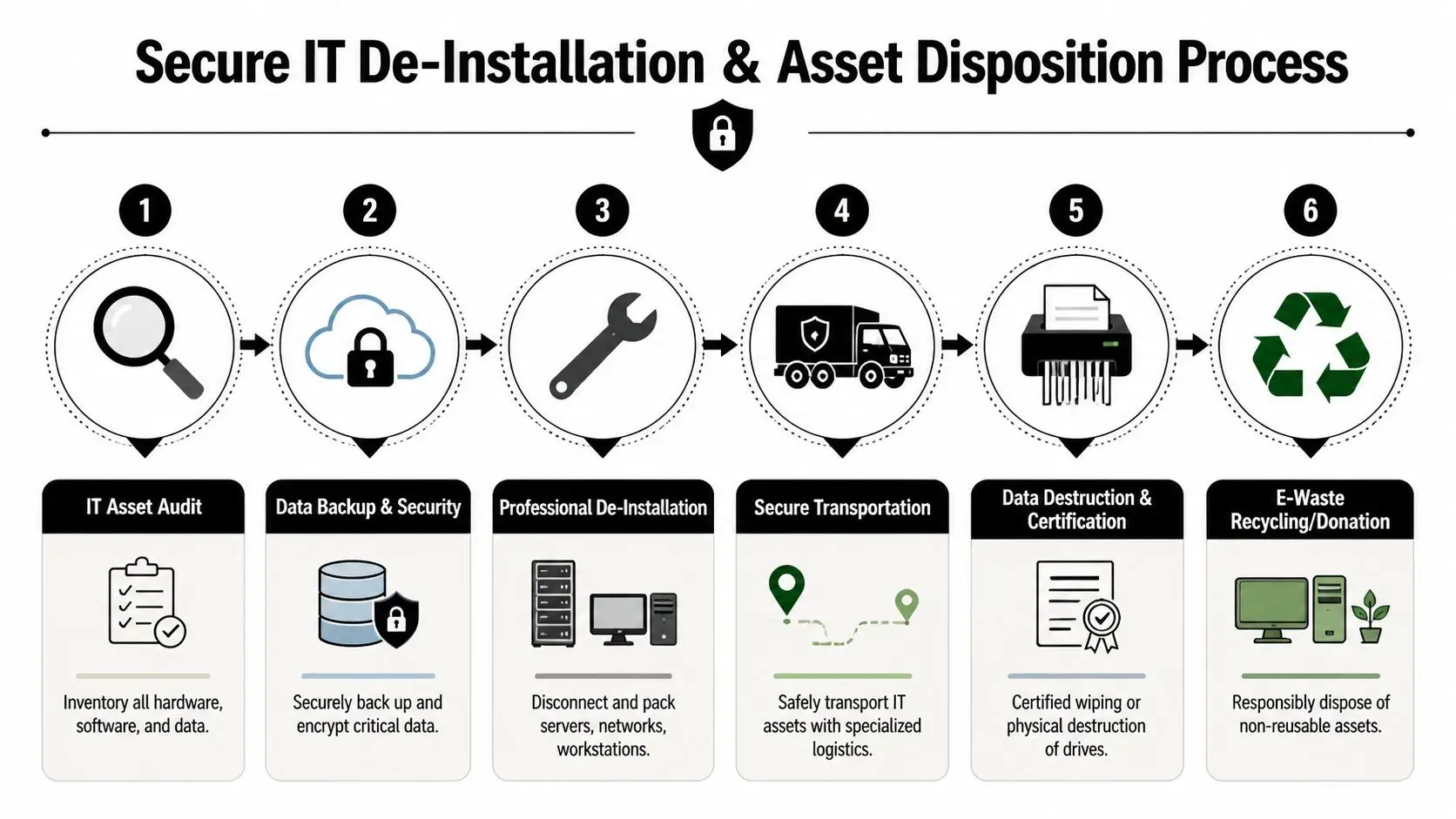
The Critical Path Secure IT De-Installation and Asset Disposition
This is the part most moving guides skip, and it’s the part that can expose the business long after the furniture is in place. Office relocations generate surplus technology fast. Old desktops get left behind. Retired drives turn up in storage rooms. Access points, printers, and conference room systems are removed with no clear disposition path.
That’s a compliance problem and a security problem.
Move Solutions’ project management guidance points out that office relocation content largely ignores secure IT asset disposition, even though the Global E-waste Monitor reported 62 million metric tons of e-waste in 2022, with only 22.3% formally recycled. During a move, that gap gets riskier because equipment is already in motion.
What secure IT disposition actually includes
It’s not enough to unplug devices and stack them near the dock. A defensible process includes inventory, segregation, data handling decisions, packaging, transport controls, and final documentation.
Start with an asset audit
Before anything is disconnected, identify what’s moving and what’s leaving service. Include:
- Endpoints: desktops, laptops, tablets, thin clients
- Infrastructure: switches, firewalls, servers, storage arrays, UPS units
- Peripherals: printers, copiers, docking stations, phones
- Media: hard drives, SSDs, backup devices, removable storage
The biggest mistake here is mixing active assets with retirement assets. If both go onto the same carts without labels and custody checks, mistakes multiply fast.
Match destruction method to asset type
Different media require different handling. Some devices can go through certified data wiping. Others need physical destruction. The right answer depends on the media, the reuse plan, and your internal policy.
What doesn’t work is making those decisions ad hoc during teardown.
Field note: If nobody can say who approved wiping versus shredding, assume the process isn't controlled well enough.
Why chain of custody matters
Chain of custody is your written record of who handled what, when, and where. Without it, you may know equipment left the old office, but you can’t prove what happened in between. That gap becomes serious when auditors, legal teams, or insurers ask for records months later.
At minimum, the paperwork should show:
- Asset identification: tag, serial, or batch reference
- Transfer points: release from site, pickup, receipt, processing
- Authorized handlers: named parties or documented crews
- Final outcome: redeployed, remarketed, recycled, or destroyed
- Proof documents: certificates tied to the processed material
This is why IT asset disposition should be integrated into the relocation plan itself, not treated as a cleanup task afterward. If you need a process built for this stage of the project, use a dedicated office relocation and IT disposition service that accounts for de-installation, secure transport, and documentation.
What fails in real moves
The weak approach usually looks familiar. Staff leave retired PCs under desks. The moving vendor agrees to “take care of it.” Someone stores old equipment in the new office for later. Nobody wants to slow down move week, so bad decisions get deferred.
That creates three predictable problems:
- Unknown data exposure
- Lost asset value
- No paper trail for compliance
A better approach is simple. Decide disposition before teardown, label by disposition path, document every handoff, and require certificates for destruction and recycling.
Managing Costs Logistics and Post-Move Success
Move budgets usually break in the same places. Not on truck charges. On the support work nobody priced accurately. IT overtime, low-voltage changes, temporary internet workarounds, extra building labor, and disposal coordination can all push the project off course if they aren’t tracked early.
The costs teams miss
The obvious line items go into the budget first. The hidden ones show up during execution.
Watch for these:
- After-hours building requirements: security staff, elevator operators, dock fees
- Special handling needs: server carts, lift equipment, anti-static packing, rack work
- Temporary service gaps: backup connectivity, mobile printing, loaner devices
- Closeout work: debris removal, recycling coordination, abandoned equipment pickup
If you’re vacating a full office, leave time to restore the old site properly. Alongside mover closeout, many teams also need to deep clean your business premises before turnover.
The move-day practices that actually help
Fancy project language doesn’t matter much on move day. Clear controls do.
Use visible labeling
Color-coded department labels work. Numbered destination zones work. Handwritten notes on random boxes don’t. Every item should tell the crew where it belongs without a phone call.
Stage IT separately
Technology should never be buried in the same flow as general office contents. Create separate staging, separate check-in, and separate signoff. That reduces loss and speeds user setup.
Run post-move validation by priority
Bring up the business in layers. Network core first. Shared systems next. Executive and customer-facing teams after that. Low-priority storage and archived materials can wait.
The fastest way to recover after a move is to decide in advance what has to work by opening hour and what can wait until the afternoon.
Recovering value from retired equipment
A relocation is also a cleanup event. Old hardware that’s no longer worth moving may still have residual value if it goes through a controlled recovery channel instead of being warehoused indefinitely.
That’s where structured asset recovery services in Georgia can help organizations offset some relocation expense while clearing out equipment that doesn’t belong in the new footprint.
Post-move success comes down to speed and control. If employees have working seats, working credentials, working network access, and no one is hunting for missing laptops or switches, the move was managed well.
Finalizing Your Relocation and Ensuring Compliance
A move is finished when the records are finished. That means signed inventories, closeout logs, vendor confirmations, and technology disposition documents are collected and stored where the business can retrieve them later.
For facilities teams, that closes out the project. For IT and compliance teams, it creates an audit trail. If any question comes up about retired equipment, you need to show what left service, how it was handled, and what happened at final processing.
The most important records are the ones many teams request too late. Certificates of recycling and destruction shouldn’t be an afterthought. They are evidence that the organization didn’t just remove equipment. It handled end-of-life assets through a documented process. Keep those records with the relocation file and procurement file, not buried in someone’s inbox.
If your move includes retired drives, decommissioned servers, old user devices, or surplus network hardware, make sure the final package includes a formal certificate of destruction. That’s the document legal, procurement, and security teams tend to need after everyone else has moved on.
For the highest-risk part of any office move, your retired IT assets and the data sitting on them, work with Beyond Surplus for certified electronics recycling, secure IT asset disposition, hard drive shredding, and documented chain-of-custody support.